The Agent Extension Stack: Skills, Plugins, MCP, and Tools
A Skill teaches an agent how to work, a Tool lets it act, MCP connects it to external capabilities, and a Plugin packages the pieces for installation.

When I first began extending agents, four terms kept appearing together: Skills, Tools, MCP, and Plugins. I kept treating them as competing names for the same thing. Does installing a Skill give an agent a new capability? Is adding MCP the same as adding a Tool? Is a Plugin simply a collection of Skills?
The confusion comes from comparing things that sit at different layers. The distinction I use is simple:
A Skill tells an agent how to work. A Tool gives it something to do. MCP connects it to external capabilities. A Plugin packages the pieces for installation.
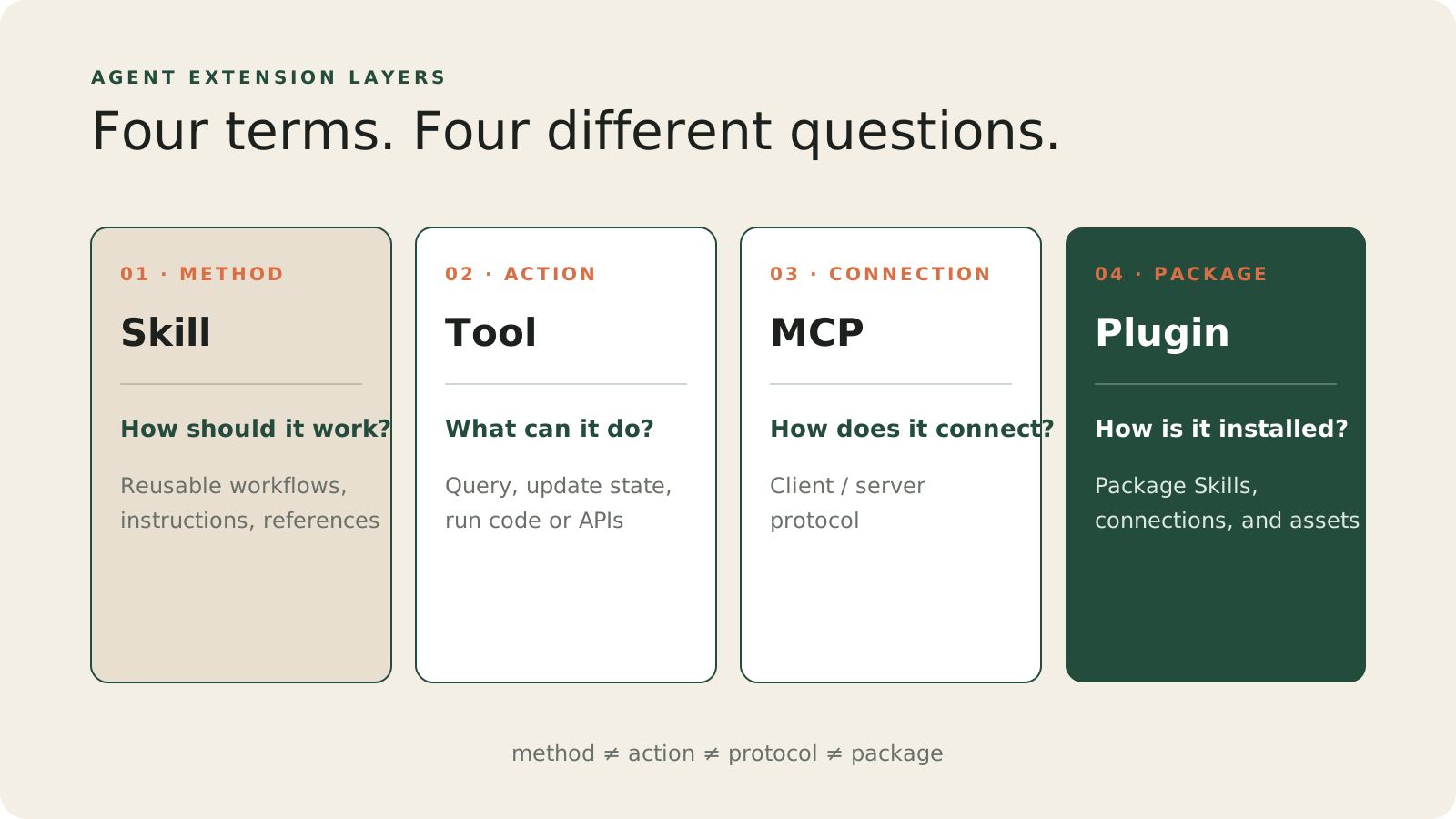 Method, action, connection, and packaging are separate design problems.
They can work together, but an agent feature does not need all four. I ask whether the agent is missing a method, an action, a connection, or a way to distribute the result.
A complete example
Suppose I want an agent to produce a weekly project report. It needs to collect project progress, identify risks, write a summary in the team’s format, and perhaps publish the result back to the project management system.
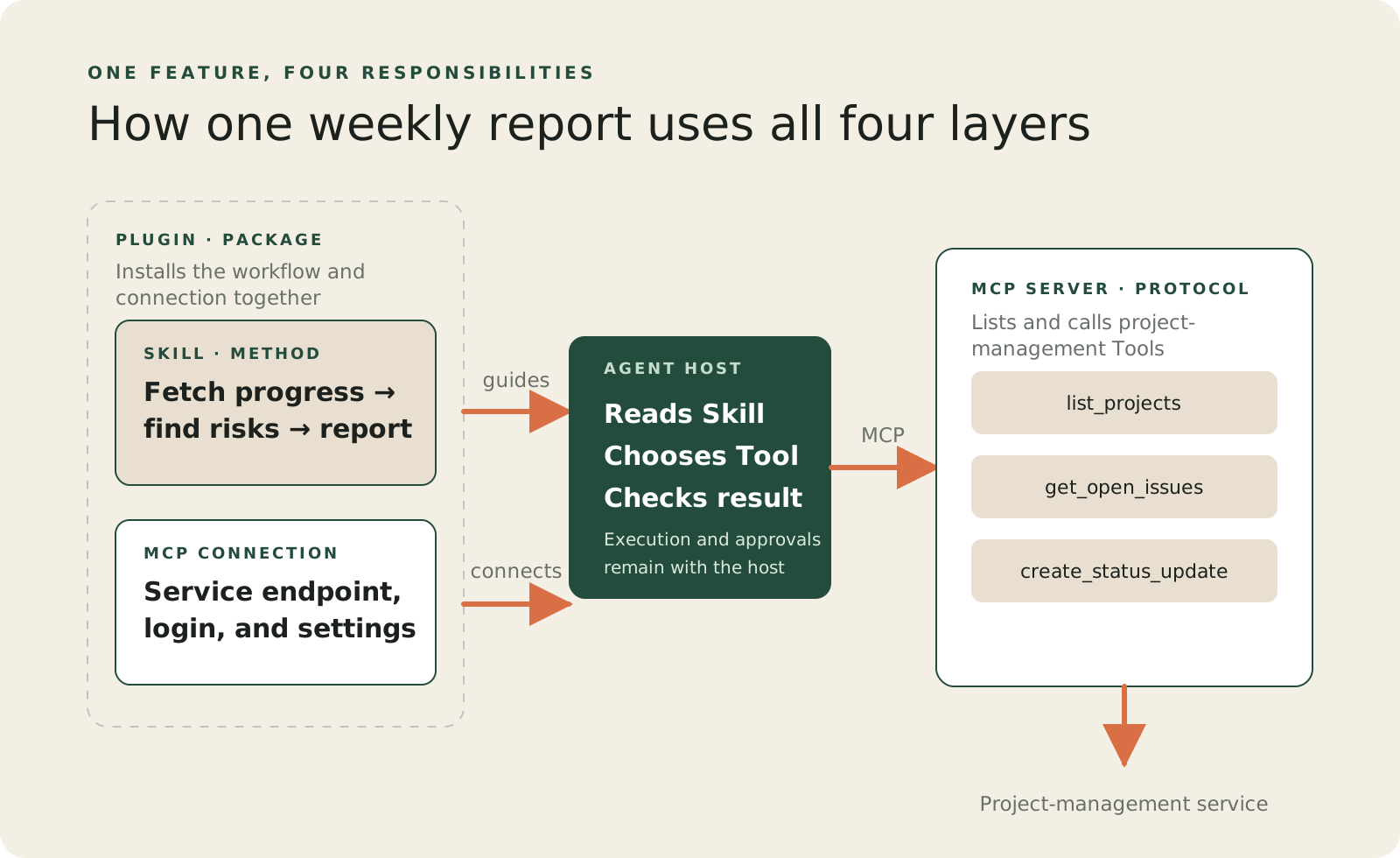 One feature can use all four layers, but each layer has a different responsibility.
The feature breaks down like this:
| Layer | Role in the example | Question it answers |
|---|---|---|
| Skill | Fetch progress, identify risks, then follow the reporting format | How should the work be done? |
| Tool | list_projects, get_open_issues, create_status_update |
What can the agent do? |
| MCP | Let the agent client discover and call capabilities from the project service | How do external capabilities connect? |
| Plugin | Package the Skill, connection, and metadata for installation | How is this set of capabilities installed and shared? |
The boundaries become clearer when each layer is considered separately.
Skill: reusable procedural knowledge
A Skill is a set of instructions for a kind of work. It tells an agent when a workflow applies, what to inspect first, which existing Tools to use and in what order, how to handle incomplete results, and what a finished output should contain.
The open Agent Skills format uses a directory containing at least a SKILL.md file. It can add scripts/, references/, or assets/ when they are useful. A compatible agent can start with a Skill’s name and description, then read the full instructions only when the task is relevant. This progressive disclosure keeps every conversation from carrying every workflow.
The harder problem: managing Skills in limited context
Writing one Skill is only the first problem. Once an agent has several Skills, it also needs to decide which one deserves context for the current task. Loading every full SKILL.md makes the conversation carry instructions it will not use. Loading too little leaves the agent without the procedure it needs.
A practical approach is to make each description specific enough for selection, load the full Skill only after it matches the task, and bring in supporting references or scripts when the workflow needs them. This makes context a resource to manage, not a place to store every possible rule.
The problem becomes more visible when Skills overlap. A vague Skill is hard to select, while a Skill that tries to cover every case becomes expensive to load and harder to follow. Keep the main instructions focused on the decisions and checks the agent must make. Move detail into references when it does not belong in every run.
Installing a Skill does not necessarily grant a new external capability. It may simply teach the agent to use its existing Tools more reliably. Even when a Skill includes scripts, the host still decides whether they can run, which runtime is available, and whether approval is required.
The distinction can be reduced to two lines:
Skill: Fetch open work, rank it by impact, and write a three-part summary.
Tool:  get_open_issues(project_id)
The first is a method. The second is an action.
Tool: the layer closest to action
A Tool is an operation an agent can choose to call. It might search the web, read a file, run code, query a database, or create a status update.
The interface shown to the model usually contains a name, a description, and structured input. The operation itself might run in a local program, an application backend, a platform-managed service, or an MCP server.
Tool is the broader concept, not a synonym for MCP Tool. A function registered directly by an application is a Tool. A function exposed by an MCP server is also a Tool. The execution paths differ, but both give the model a callable capability.
Tool execution is where the important safety boundaries belong. Arguments produced by a model are still untrusted input. A Tool that writes data, issues a payment, or deletes something still needs authorization, validation, confirmation, and controlled failure handling. Knowing when to request an action does not grant the model permission to perform it.
MCP: a way to connect capabilities, not the capability itself
MCP, or Model Context Protocol, is a client/server protocol. It defines how a client establishes a connection, discovers what a server provides, and calls the server’s capabilities.
When people say “add an MCP,” they usually mean adding an MCP server connection. That server can expose three main kinds of primitives:
tools: functions the model can call;resources: data the application can bring into context;prompts: prompt templates usually selected by the user.
MCP is therefore more than a group of Tools, and it is not a workflow. It solves an interoperability problem: how different agent clients can discover and use external capabilities through a consistent interface.
Tools do not require MCP. If a function is used only inside one application, registering it directly may be enough. MCP becomes valuable when the same capabilities need to serve several compatible clients, or when the server also needs to provide resources and prompts.
Plugin: turning components into an installable product
A Plugin is the packaging and distribution layer. It can contain Skills, connect to an MCP server, or provide both. It lets a user install a named, versioned set of related capabilities instead of moving instructions and connection settings one by one.
Plugin is not a universal cross-platform format. OpenAI’s ChatGPT and Codex use .codex-plugin/plugin.json; Claude Code has its own .claude-plugin/plugin.json and loading rules. Both platforms use the word Plugin, but their manifests are not interchangeable.
The components in the middle are more portable. A SKILL.md written to the public Agent Skills specification can provide a common baseline, and an MCP server can implement the public MCP protocol. The outer Plugin package remains an adapter for a particular host.
| Component | What can travel across hosts | What still needs host-specific testing |
|---|---|---|
| Skill | The public directory and SKILL.md baseline |
Triggering, extra frontmatter, script permissions |
| MCP server | Protocol behavior and server implementation | OAuth, approvals, output limits, supported features |
| Plugin | The general packaging idea | Manifest, paths, validation, installation, publishing |
How I choose a layer
I do not begin by assembling all four layers. I first identify what is missing:
| If the agent is missing… | Add… |
|---|---|
| A consistent method, style, or review process | A Skill |
| The ability to read data, change state, call an API, or run code | A Tool |
| A standard way for several clients to reach external capabilities and context | An MCP server |
| A way for users to install, update, or share the whole set | A Plugin |
This keeps infrastructure tied to a real problem. If a concise Skill is enough to help an agent use existing Tools well, there is no reason to add an MCP server. If one application needs one local function, there is no reason to package it as a Plugin first.
Keep the distinction handy
These terms often appear together because one product may contain all four. They still answer different questions: a Skill describes method, a Tool exposes an action, MCP connects external capabilities, and a Plugin packages the result. Find the missing layer, then add only that layer. Each piece should exist because it solves a problem the others do not.