Tracking One Performer Through a Wide Performance Video
I adapted public ideas from an AI-assisted broadcast workflow into a cautious follow-cam experiment for my bias.

Sometimes I want to follow my bias through the whole performance.
That was the practical reason for this experiment. I first framed it as a way to make fancams for members who do not get one. In practice, I use it more simply: to follow my bias through a continuous wide shot.
A wide performance video can hold the whole stage, but it is hard to watch when you want to stay with one performer through the choreography. Cropping the video was the easy part. The difficult question was keeping the crop with the right person.
Borrowing a method, not a proprietary system
KBS has publicly described VVERTIGO as an AI-based production system that generates individual videos from a single 8K camera. KBS and NHK later documented an AI-assisted fancam demonstration with VVERTIGO through the IBC Tech Papers programme. KBS’s description and the IBC abstract gave me a useful direction.
I was not trying to reproduce that system. Its face corpus, models, graph-clustering method, and thresholds are not public. What is public is the shape of the workflow: sample faces, link observations into a trajectory, reject implausible movement, make the keyframes reviewable, then reframe the source. The VVERTIGO user manual also describes editing the analysed keyframes instead of treating the first automatic result as final.
That distinction mattered. I could build a smaller experiment around the same questions without claiming that it had the same data or accuracy.
Three stages of the solution
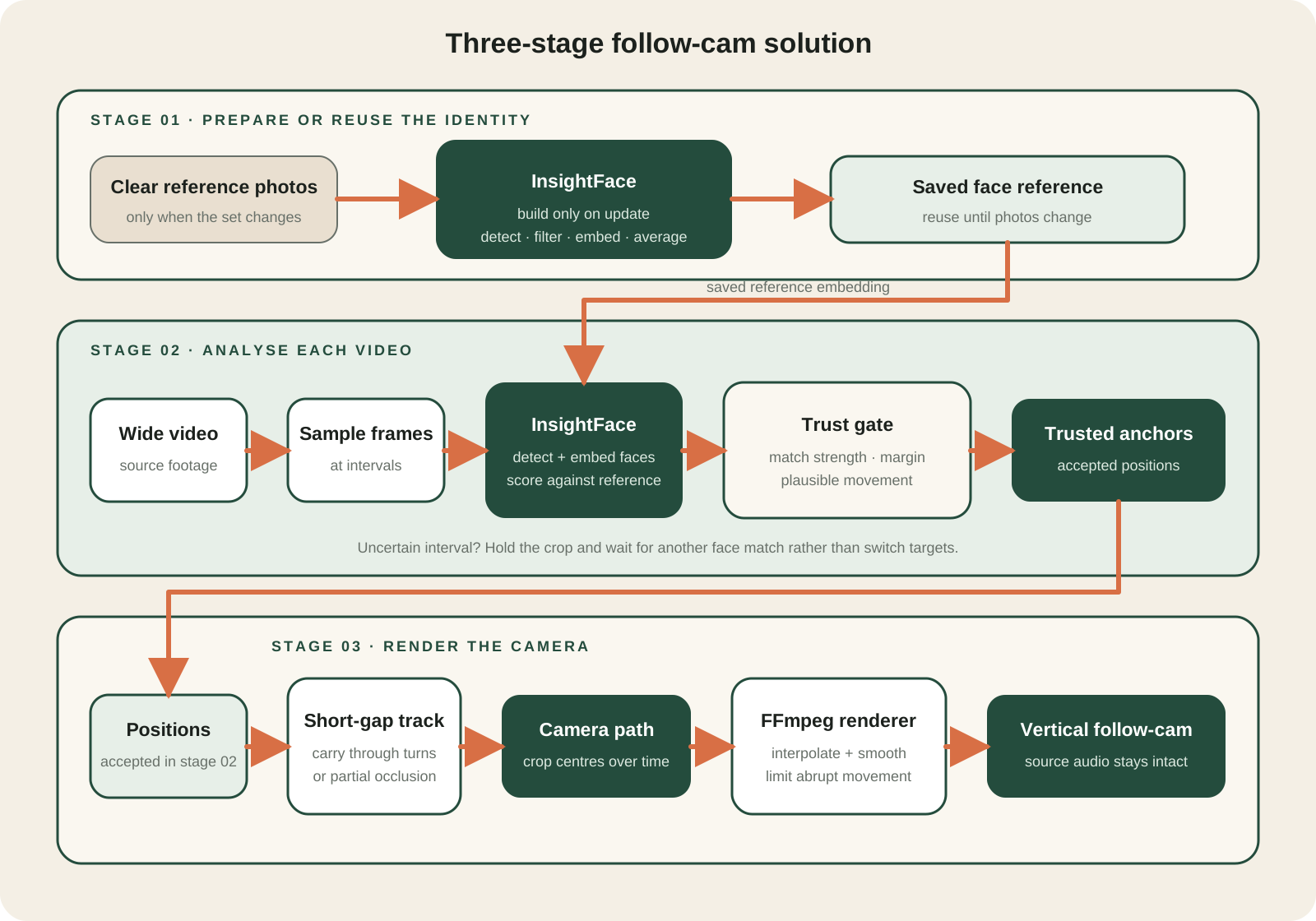 The saved reference is reused across runs; position validation and rendering happen for each video.
At a high level, the solution loads a saved reference for one performer and regenerates it only when the reference photo set changes. It then turns only well-supported observations from a new video into a camera path. The renderer uses that path to make the vertical clip; brief tracking gaps can help the camera keep moving, but they cannot establish a new identity. I will go deeper into the implementation and trade-offs of each stage in follow-up articles.
Start with a named person
I first collect a small set of clear reference images for the performer I want to follow—currently, Yooyeon. InsightFace detects the faces in those images, discards weak outliers, and averages the remaining face embeddings into one reference. I save that reference and reuse it for later video runs; I only rebuild it after I add, remove, or replace reference images.
For each new source video, it samples frames and InsightFace creates an embedding for every visible face to score against the saved reference. A high score alone is not enough. The best candidate also needs enough separation from the second-best candidate, and a new position cannot jump too far from the last trusted position without being questioned.
When the evidence is weak or ambiguous, the camera has less material to follow. I would rather leave a gap than assign the crop to another member because their face happened to be clearer in one frame.
Separate identity from movement
The face reference answers one question: is this the performer I asked for? It does not answer every question that comes next.
Once I have a trusted face position, I can use it as an anchor for a short trajectory. A person track can carry the camera position through a brief gap, such as a turn or a partial occlusion, but it cannot establish a new identity on its own. If the target disappears for longer, the system waits for face evidence again before it accepts a different track.
The diagnostic below shows the difference: the accepted match is marked in green, while the remaining detected faces are marked in red.
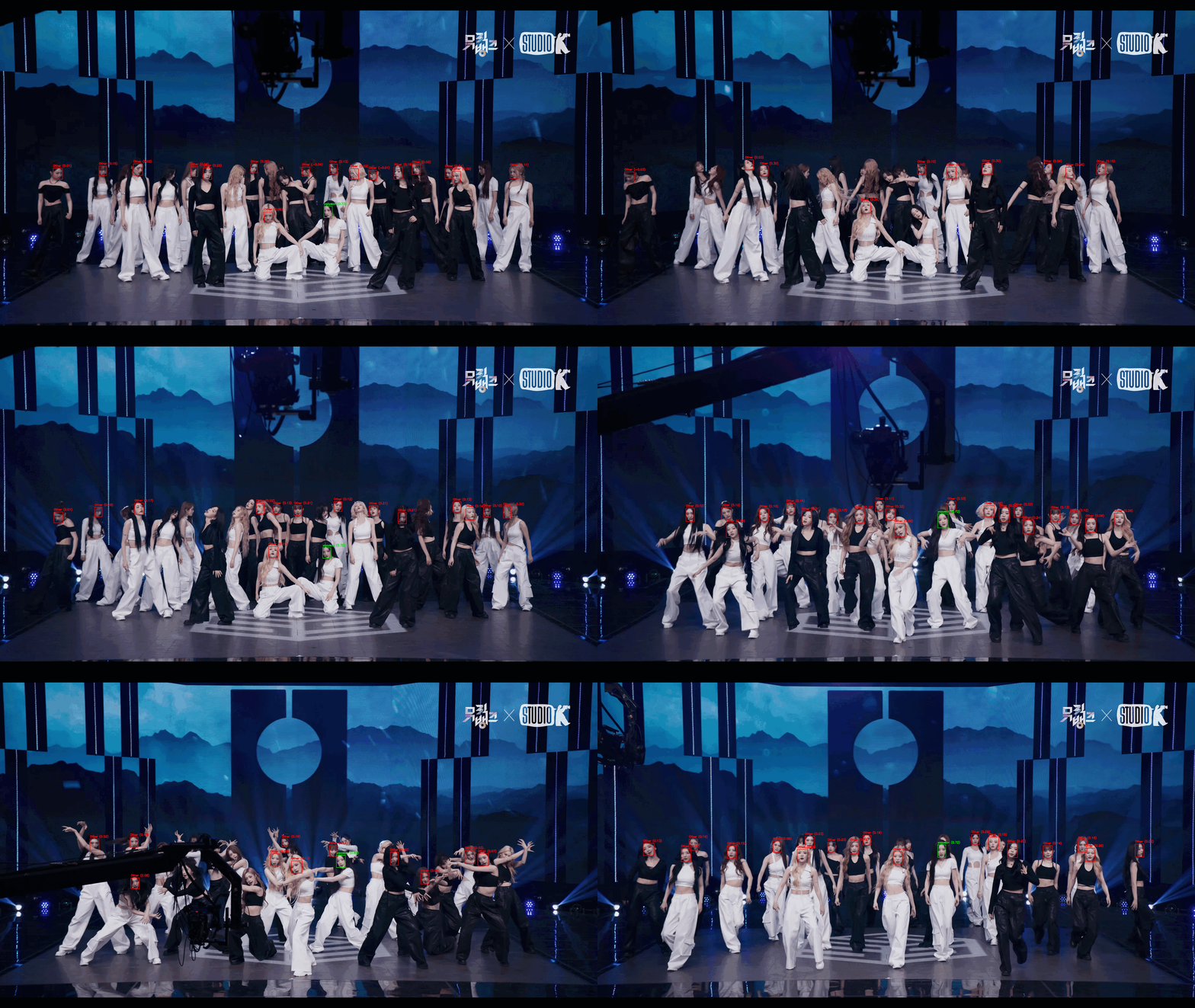
This is the part I found most useful from the public workflow. A smooth path is a presentation choice. It does not prove that the path belongs to the intended person.
Render a camera path, not a new performance
After the accepted positions form a trajectory, the renderer turns it into a vertical crop. It interpolates and smooths the crop centre, limits abrupt movement, and keeps the source duration and audio. The output can run at a fixed 60 frames per second by interpolating the crop position between source frames and holding the source frames when necessary. It does not invent missing performance footage.
I also keep the evidence beside the output. The diagnostic files record face scores, rejection reasons, tracking state, and crop geometry. That makes it possible to inspect a questionable moment instead of deciding from a finished video that merely looks smooth.
Here are the first 40 seconds from one run. The clip is compressed to 640 pixels wide at 30 frames per second for the web, while keeping the source audio.
Keep the first version narrow
I only treat continuous wide-source footage as a supported input. A hard cut or a switch to another camera breaks the time continuity that the tracker relies on. The experiment also runs offline because I care more about inspecting the result than producing it live.
I still need a human boundary. I curate the reference images and review ambiguous intervals. A later editor could let someone correct a keyframe segment, but I would rather record an uncertain gap than hide it with a confident-looking crop.
For now, it remains a deliberately narrow, personal tool. I will cover the technical decisions, experiments, and trade-offs behind it in follow-up articles.