Moving Two Small Applications to Cloudflare
Field notes on using Workers, Static Assets, D1, R2, Cron Triggers, and Access to move two private applications beyond a local machine.

Moving to the cloud did not mean moving every piece of work into the cloud.
I recently moved two small private applications away from workflows centred on a local machine. One coordinates work involving large files and an existing processor. The other checks external sources on a schedule and keeps a structured history.
Their product details are different, but their Cloudflare architecture converged. Both needed a private web interface, state that survives restarts, recurring work that does not depend on my laptop, and a deployment I could operate without maintaining a server.
Cloudflare became the control plane around those needs. It serves the interface, runs the API, stores application state, wakes up scheduled work, protects private routes, and, where necessary, holds large files. I matched each responsibility to the smallest Cloudflare service that fit.
The shared shape
At a high level, both applications now follow the same path:
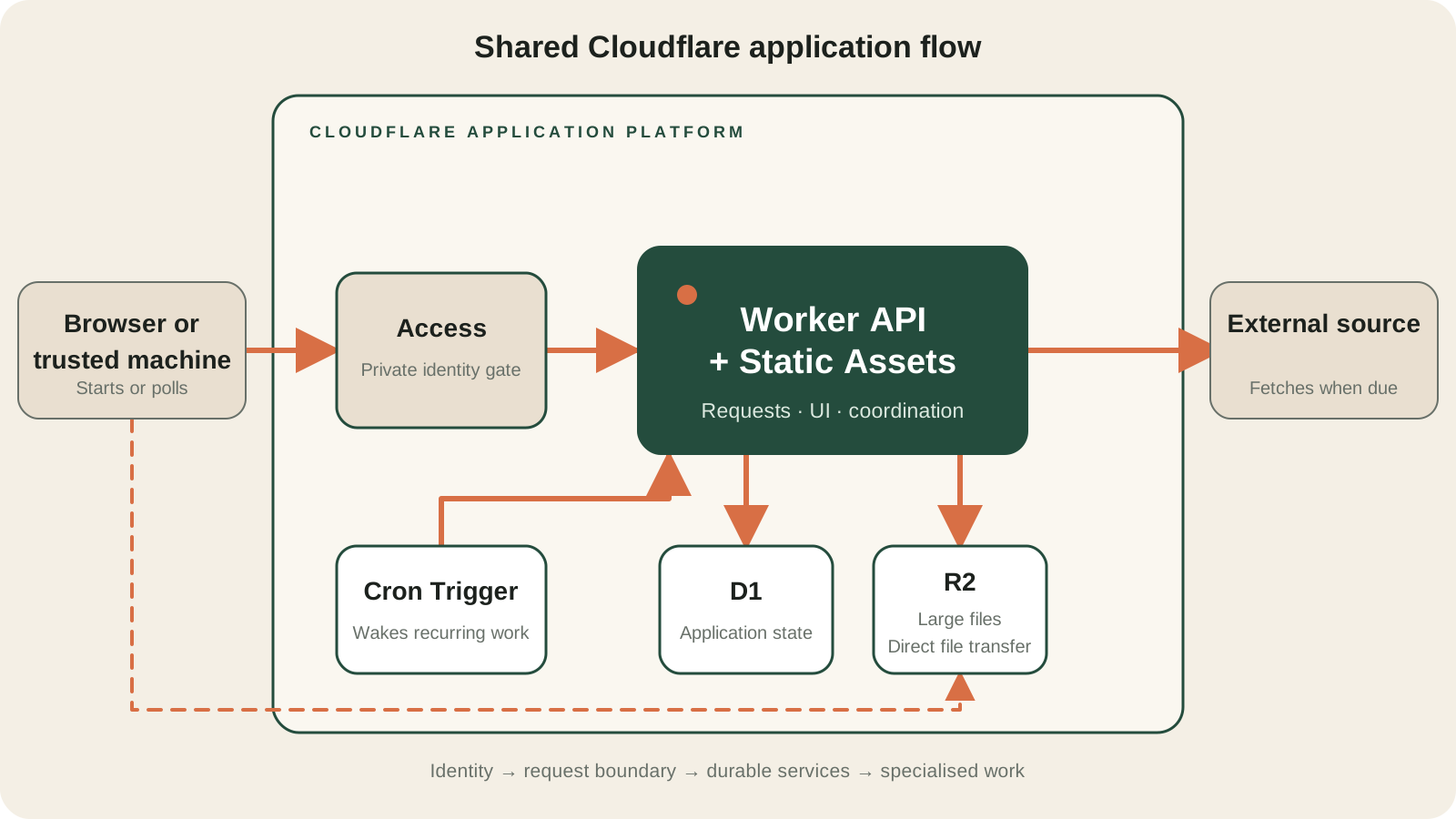 The shared Cloudflare control plane used by both applications.
This is not an all-edge architecture. It is a small platform boundary: Cloudflare handles requests, identity, state, storage, and timing, while specialised work can still happen elsewhere.
Workers and Static Assets form one application boundary
Both interfaces are browser applications built into static files. Cloudflare serves those files and sends API routes through the Worker in the same deployment. The Static Assets routing configuration can decide which paths should invoke Worker code first, so the UI and API can share one hostname without turning every asset request into application logic.
That removed the need for a separate frontend host and backend service. I did not need server-side rendering for a private dashboard, and I did not need a second deployment merely to serve the interface.
The Worker then became the request boundary. It validates input, applies authorisation, reads and updates state, calls external endpoints, and issues temporary storage access. It also exposes a scheduled handler for recurring work.
I deliberately kept CPU-heavy file processing outside the Worker. Cloudflare coordinates that work, but an existing machine still performs it. The other application only needs lightweight HTTP collection, so that part can run directly inside the Worker. The same platform can support both patterns without pretending every workload belongs in the same runtime.
D1 remembers what the Worker cannot
Workers are a good fit for request and schedule handling, but the applications still need durable memory. D1’s Worker binding provides that memory through SQL without adding a separate database server or network client.
In the file-heavy workflow, D1 records work state, ownership, progress, and object metadata. In the scheduled workflow, it is the system of record for configuration, collected measurements, and history. The domain tables differ, but the role is the same: D1 holds the facts that must survive between Worker invocations.
It also gives scheduled work a stable coordination point. A Cron Trigger can wake the Worker, but D1 decides what is actually due and what has already been recorded. Keeping that state in the database makes the scheduled handler repeatable instead of depending on in-memory timers.
R2 carries bytes while the Worker carries permission
Only one of the two applications needs object storage. Its files are too large and too temporary to belong in D1, and routing every byte through a Worker would mix storage transfer with application control.
R2 keeps those concerns separate. The Worker authorises an operation and creates a short-lived URL; the browser or processor then transfers the object directly. Cloudflare documents both direct uploads to R2 and presigned URLs for granting time-limited access to one object operation.
The useful boundary is simple:
- D1 decides whether a file should exist and records its state.
- R2 stores the bytes.
- The Worker grants temporary access without exposing storage credentials.
Presigned URLs are bearer credentials, so I keep them short-lived and limited to a specific operation and object. Application state controls when a file expires, while scheduled maintenance handles retention.
R2 is the data plane for large transfers, while the Worker remains the control plane.
Cron Triggers replace local timers
Recurring work was one of the clearest reasons to move away from a laptop-centred setup. Cron Triggers invoke a Worker’s scheduled handler from a cron expression, which fits both applications in different ways.
For the data-oriented application, one permanent trigger queries D1 for active work and performs the due checks. I chose one shared schedule rather than creating a new platform schedule for every user-created job. The job definitions and deadlines stay in D1, where they can be inspected and changed without reconfiguring Cloudflare.
For the file-oriented application, a less frequent trigger performs retention work: clearing expired objects and recovering storage that an interrupted upload could otherwise leave behind.
Cron wakes the Worker. D1 remains the place where the Worker decides what work is due and records the result.
Access protects both people and machines
These are private tools, so I did not want to build a login system before I could use them. Cloudflare Access sits in front of the applications as the identity-aware gate. Human access follows an identity policy, while an automated processor can use a service token instead of pretending to be a person.
The Worker still validates the identity token at its own boundary. Cloudflare’s Access JWT validation guide describes why the application must not trust an unverified identity claim.
Access answers who reached the application. The Worker still decides what that identity may do. Human and machine routes have different permissions, and any deliberately shareable route needs its own narrow application-level boundary instead of weakening protection for the whole app.
This split let me reuse Cloudflare’s authentication layer while keeping authorisation close to the data and actions it protects.
What I deliberately did not add
The two applications use much of the Cloudflare surface I currently need, but they do not use every available service.
There is no separate Pages deployment because Workers Static Assets already serves the browser interface beside the API. There is no KV because the important state is relational. There is no Queue or Durable Object because the current concurrency is small enough for D1-backed coordination and a single scheduled poller. There is no reason to move specialised, CPU-heavy processing onto the edge when an existing processor already handles it well.
Those are not permanent rules. If throughput, coordination, or deployment boundaries change, another service may become justified. For the current workloads, adding them would create more operational surfaces without solving a present problem.
What the move changed
The biggest improvement is not raw speed. It is that application responsibilities now have durable homes.
- The interface and API are available without my laptop acting as the server.
- D1 keeps state across requests, deployments, and machine restarts.
- Cron Triggers continue recurring work without a local timer.
- Access makes the default boundary private.
- R2 handles large transfers without turning the Worker into a file proxy.
The move still leaves operational work. I need to order migrations and deployments carefully, rotate secrets and service tokens, define retention, and design recovery for interrupted work. Managed services reduce the infrastructure I own, but state transitions and security boundaries still need attention.
Takeaway
Moving these applications to Cloudflare was less about choosing a cloud provider than about separating responsibilities.
Workers handle requests and coordination. Static Assets delivers the interface. D1 remembers. R2 stores large objects. Cron Triggers wake recurring work. Access protects the boundary.
That combination covers the platform I actually need today. The useful lesson is not to move everything to the edge or adopt every Cloudflare product. It is to keep the Worker small, make state explicit, and let each managed service do one clear job.