From Local Scripts to a Serverless Data Collection Pipeline
How I moved a local Python data collector to Google Cloud so a teammate could trigger it remotely through Telegram.

A script on one laptop is convenient until someone else needs to run it while that laptop is asleep.
In a small collaboration, I owned the backend for a data collection project. The first version was a set of Python scripts running on my computer.
That setup worked, but my friend had to wait for me to be available whenever new data was needed. We needed to move the execution to the cloud and give the workflow a simple remote interface.
From local execution to cloud execution
The local process was straightforward:
- Run
python main.pyon my laptop. - Fetch pages and parse them with BeautifulSoup or Selenium.
- Save the results to CSV.
- Upload the data to Google Sheets.
The weak point was not the Python code. It was the dependency on my machine. There was no remote trigger, no background execution, and no way for my teammate to start a run independently.
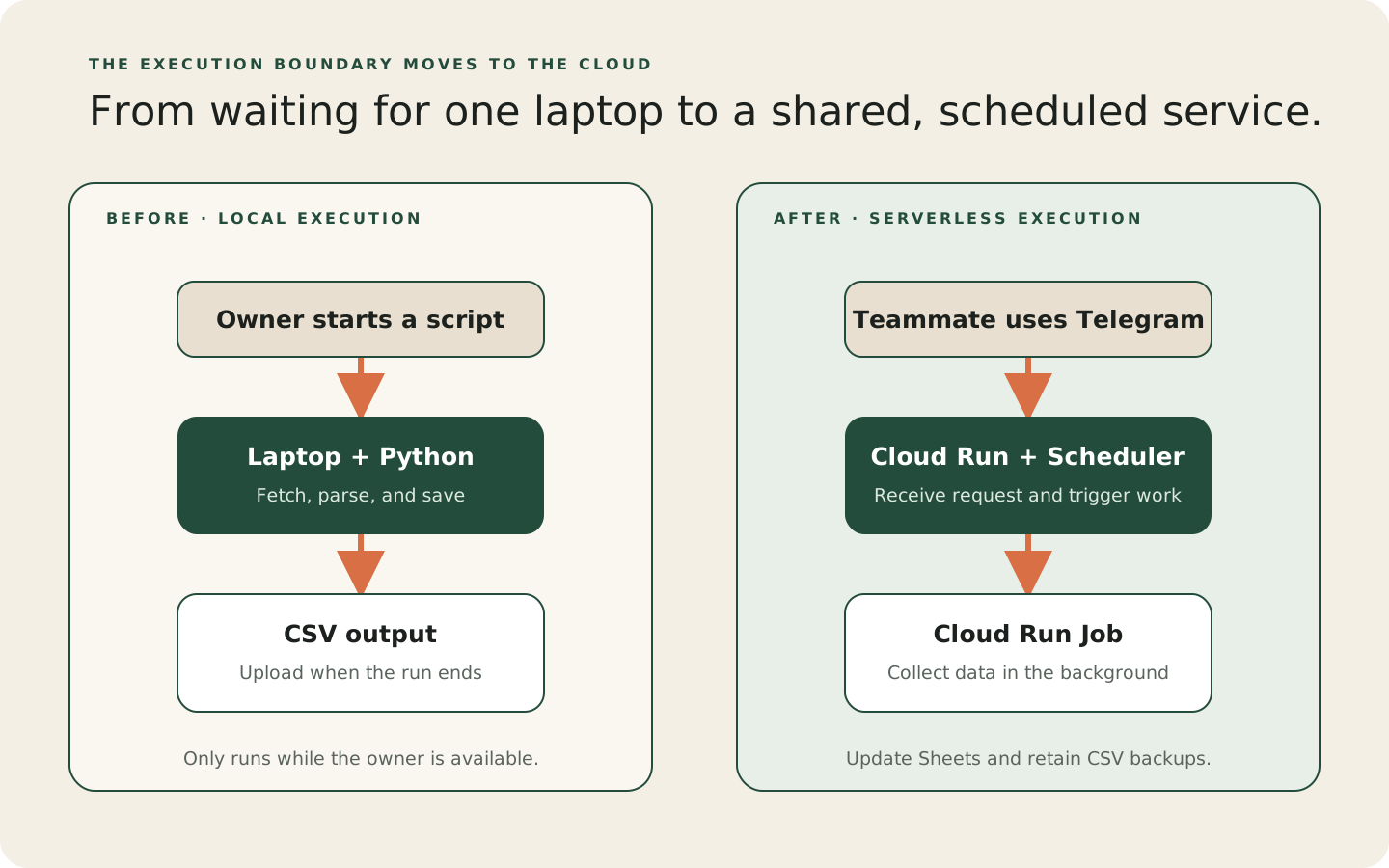
The new architecture
Because the existing system already used Google Drive and Sheets, Google Cloud was a natural fit. Telegram became the interface because my teammate could use it without opening a terminal.
The cloud version uses five pieces:
- A Telegram bot receives commands through a Cloud Run webhook service.
- Cloud Scheduler creates recurring triggers for active tracking requests.
- A Cloud Run Job performs the data collection.
- Google Sheets holds current results, while Google Drive keeps CSV backups.
- Secret Manager and IAM service accounts protect credentials and service-to-service calls.
Why use both Cloud Run Services and Jobs?
The bot and the tracker have different jobs. The bot needs to respond quickly to a user. The tracker needs to run a task and finish it without making the user keep a request open.
Cloud Run Services fit request-response work such as webhooks. Cloud Run Jobs fit task-oriented work such as data collection.
I kept the Telegram bot in a Service and ran the collector as a Job. The bot stays responsive while the worker continues in the background.
This split also makes the lifecycle clearer. A user starts tracking through Telegram, the bot creates a schedule, and each scheduled execution runs the worker with the relevant parameters.
Cloud Scheduler as the recurring trigger
Calling the worker directly from the bot would not be enough. The request would disappear if the bot restarted, and the bot would need to manage repeated runs itself.
Cloud Scheduler provides the persistent recurring trigger:
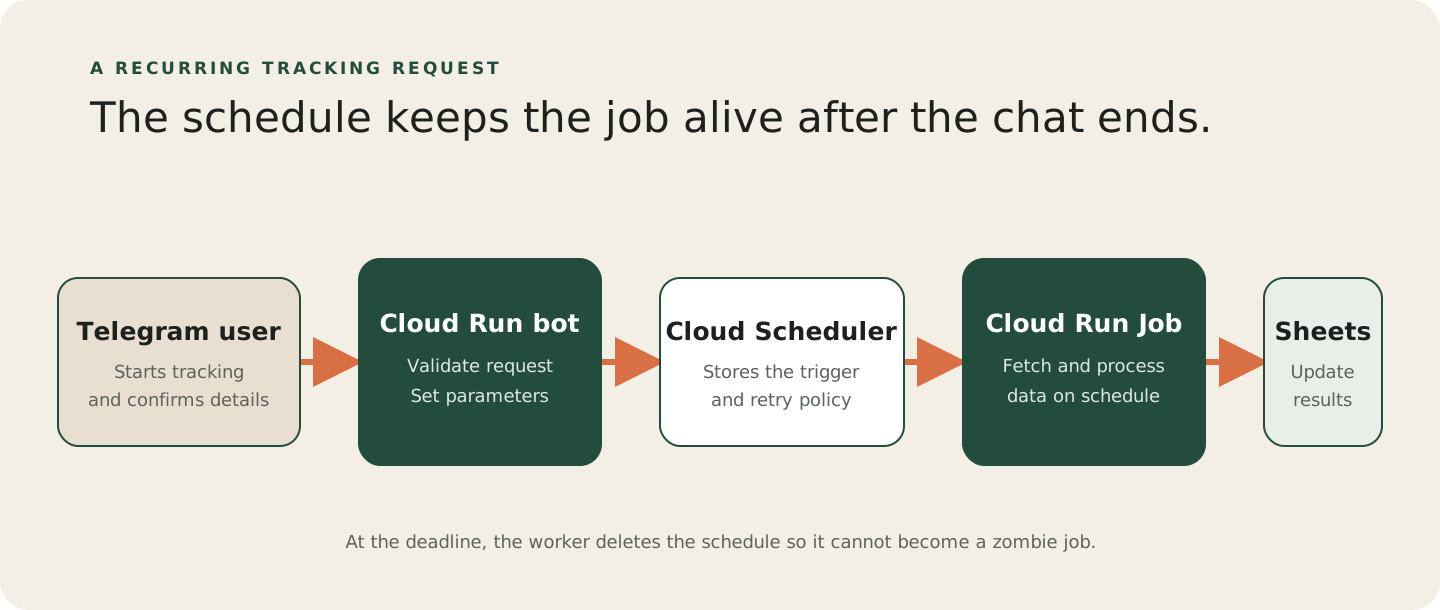
The schedule stores the request outside the bot process. That gives the workflow a place to recover from restarts and a clear record of active jobs.
Why not a cron container?
A container with a while True loop would keep a process running just to check the time. Cloud Tasks and Pub/Sub could also solve parts of the problem, but they would add more infrastructure than this simple recurring job needs.
Cloud Scheduler already provides scheduling, retries, logs, and a clean place to stop the workflow.
Security and identity
The local version depended on a personal credentials.json file. That was not a suitable boundary for a cloud deployment.
The cloud version uses separate service accounts for the bot and worker. Each identity receives only the permissions its role needs.
The bot can create or invoke the relevant jobs, while the worker can update the data stores and clean up its own schedule.
Secrets such as the Telegram token are stored in Secret Manager and injected at runtime. They do not need to live in the repository or inside the container image.
The project also ran into Google Workspace organization policies. Some actions that are easy in a personal project, such as creating public network access or long-lived service-account keys, were restricted.
Those restrictions pushed the design toward IAM-based service-to-service access instead of copied credentials.
The deployment pipeline
I wrapped the deployment steps in a deploy.sh script so each release follows the same sequence:
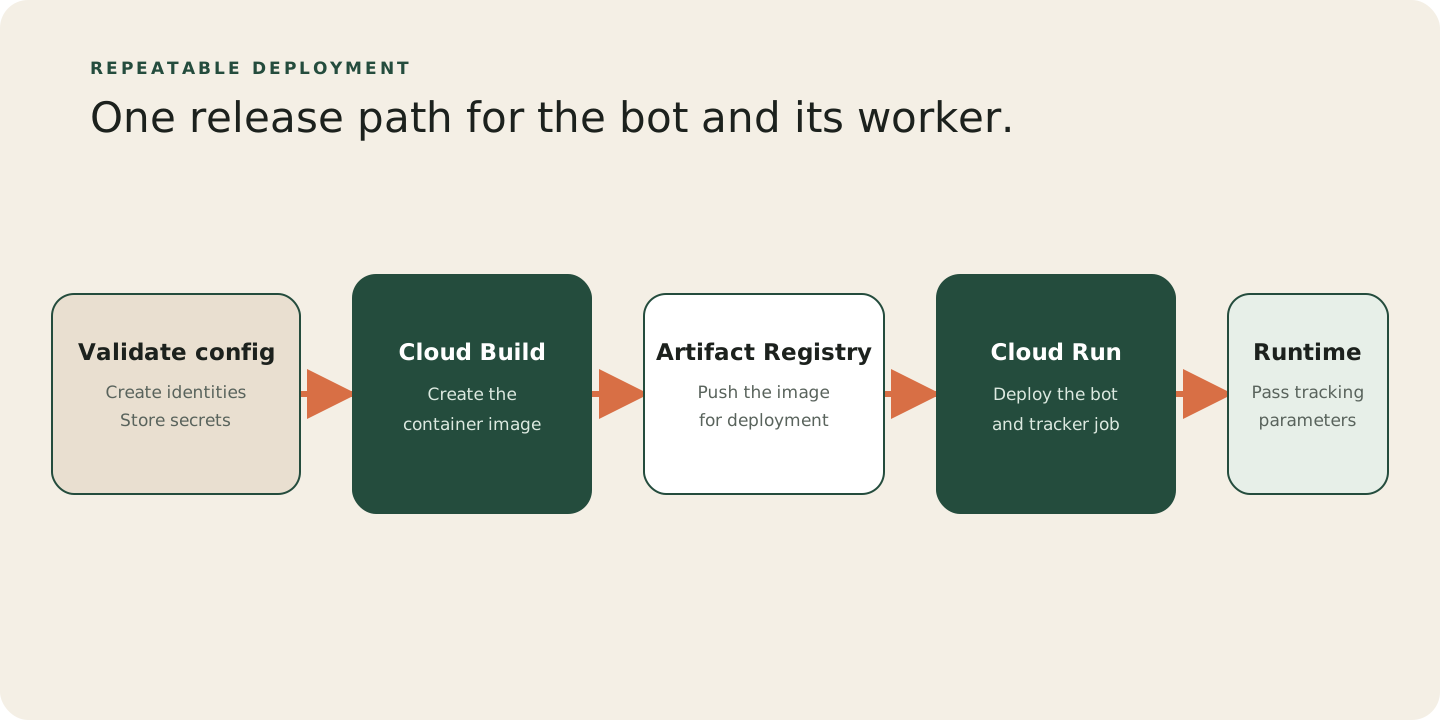
The same image can therefore handle different artists or events without creating a new codebase for each request.
Failure handling and cleanup
Time zones
The user’s deadline is local time, but schedulers often default to UTC. In this project, that caused an eight-hour offset for Hong Kong users.
Every scheduler job now sets Asia/Hong_Kong explicitly.
Avoiding zombie schedules
The /stop command lets a user cancel an active schedule. The worker also deletes the schedule when it reaches the requested deadline.
This two-sided cleanup prevents a completed request from continuing to consume API calls.
What comes next
Remote execution is now in place. Next, I want to make the Telegram conversation a reliable way to configure and monitor these jobs.